More Modern Drawing

I posted recently about using Pixelmator for my D&D map. Friend-of-the-Snarking-Post Tony made a comment about how he had recently acquired Pixelmator and so he was kind of following along with my work.
How timely. I recently bought Pixelmator myself, as part of a Mac application bundle deal. I’ve never really done any computer-based drawing, except for some very basic doodling in MS Paint and similar tools. In particular, I’ve never used Photoshop, or any other “layer based” drawing tool. So I decided to play with your drawing (well, an approximation thereof) as an experiment in Pixelmator. With respect to the cities and their text, it seems to me that in order to reposition them (or replace the text), you have to cut and paste, which creates a new layer, then move the city’s layer to get the city re-positioned, and finally merge the new layer back into the main “Cities” layer. Does that sound right, or is there some better way to do that? At first, I thought I should be able to “select” a block around the city and just move it around, as I would do with an object in Visio or a similar tool. But I guess that’s one of the fundamental differences between vector-based and bitmap-based drawing tools. At least I think that’s the right terminology. Anyway, thanks for reminding me to start playing with Pixelmator.
Well, if people are going to play along I can throw the files up! Here's a few more bits of work I've done over the last week or so, plus some discussion of what's underway. First off, to Tony's question: No you can select a block and move it about. I didn't move the cities on this version of the map but I did move a few of the text labels to make room for some roads. One thing I know from watching the "pros" is that real artists will use keyboard shortcuts - they pretty much work with a pen in one hand on the tablet and the other hand on the keyboard doing tool selection and sometimes even scrolling the screen. So, to move part of a layer in Pixelmator:
  1. Make sure you're working on the layer you want to be working on.
  2. Use the Rectangular Marque Tool (hit 'M') and draw a box around what you want to move
  3. Use the Move Tool (hit 'V') and you can drag the selected box around in the layer.
You're done! (You can also use the move tool and hold down Option to get the "Duplicate" tool and make a copy of a selection within the same layer. I used that technique to make the city dots for the two Dwarven mines without creating new layers for them.) As a random note, I notice that if you flatten text you lose your font information. I'm using 14 point regular Hoefler Text for the labels on this map.
World Map 1-18-09.png
(click image for embiggenation) Changes:
  • I created a "Lego Tree" brush and used it to paint on the Tarsenwald Forest
  • I added a backfill for the Tarsenwald in a separate layer so I have the shape available later if I need it.
  • I added the Dwarven mines of Barin's Respite and Thunderaxe Hall to the Cities layer
  • I labeled the Cairnflow River (not sure why I missed this before.)
  • I extended the Cairngorm Peaks to the south and also added in a western spur. (I needed to explain why a forest is one side and a desert on the other.)
  • I added the Tarsis Desert, home of the slavers who destroyed Klavin - this event features in two characters backgrounds.
  • I added a layer with roads. I draw on the road layer at full opacity, but the layer itself is set at 50% opacity so it blends against other items such as the Cairngorm Peaks. It's below the City layer so I don't have to worry about the edges versus the city dots.
I need to label the sea (the Crescent Sea) and we could use some more detail east of the Peaks but overall it's taking shape. The next thing I'd like to do is break up the solid color fills with some texture, but I'm pretty happy with what I have so far. There are twelve layers now - two more for Tarsenwald, two for the Tarsis Desert, and one for the roads.
Layers 1-18-09.jpg
Here's all of the source files and the Pixelmator file itself.
Read more

iWork '09 gets mixed marks

In the past I've complained about iWork '08, specifically about the limitations of Numbers in creating a chart and about Pages being unable to create mailing labels. Well I got iWork '09 on Friday and installed it today. It's a mixed bag. Numbers seems to be much better in terms of performance. At some point last year I had split the cat weight spreadsheet into two parts because my desktop Mac Pro would often beach-ball when trying to add data to the chart. Yes, you read that right. I've got around 3 years of data for my cat weights and it was too much data for Numbers '08 to crunch smoothly on a four-core machine with four gigabytes of RAM. Two cats, weighed roughly weekly, and a second set of weights to draw a "target weight" line. (I no longer draw that target line, but I did back in 2006 & 2007.) Definitely less than one thousand data points in the set, probably around 600. I'm happy to report that Numbers '09 seems much improved in terms of performance. I fiddled with the old chart a bit just to see how it worked with the "big" data set and couldn't get a beach-ball. The chart still can only have 10 steps, but it does allow me to set the chart's min/max values to ones inside the data set. This means I can make the chart go from ten to twenty pounds and Heisenberg just spikes off the chart for that one week where he broke twenty pounds. Pages opened a few Pages files I have lying around just fine. It still has absolutely no options for printing mailing labels, despite adding a stack of new formats. (Is "Loft for Rent Flyer" really a more useful format than "sheet of return mailing labels"? Really? I do love the specificity of it though. Don't try renting your crappy old suburban condo with this format buddy!) It did occur to me to check if Address Book would print a sheet of labels and for a moment I thought I was onto something. Address Book will print labels, but only one label per Address Book entry and you can't pick which label on the page it is. (In other words, Address Book is optimized for printing labels for a whole Christmas List of people which isn't a bad thing but it isn't useful for my task.) Some of these issues are getting more severe because I've banished Microsoft Office altogether from my Macs. (I still have Excel 2000 installed in a Windows ghetto box for work reasons, but I don't have to like it, and even there I think I only installed Excel, not the full Office.) I've been debating what to do about my own personal weight spreadsheet (which I only have on paper for the last few months) and I'm almost out of return labels. I'm happy to say that I think I could easily recreate the weight charts from The Hacker's Diet in Numbers '09 now and not feel like I dip my computer in molasses to update the data. As for the labels ... I'll probably borrow one of Karin's laptops, use Microsoft Word and print out a PDF file of a sheet of labels. That's ridiculous but Apple doesn't want to seem to solve the problem. I was hopeful that Pages '09 would print labels because mail merge is a big feature they added but no dice.
Read more

Modern Drawing

The return of D&D to my life continues to have odd ramifications. The latest one is that I'm coming to grips with drawing in a modern art program. I use Pixelmator which would probably be very familiar to any Photoshop user. Pixelmator uses the GPU for nice performance and is a fraction of the cost of Photoshop but it has the same basic concepts of drawing with layers, masks, and brushes. The last time I ran a role-playing campaign I did maps with DeluxePaint on the Amiga (Ouch, ouch! It hurts to admit how long ago that was.) so that was all direct pixel-by-pixel editing. Long-time readers might be saying "Wait, I've seen you use Photoshop Elements before so what are you talking about?" Well, dear reader, you're absolutely correct but you've seen me use Photoshop as a photo editor, not for drawing. I'd mainly run filters, levels and the like and maybe a touch of cloning in order to remove something. Drawing in such a program is powerful but for me it's an unusual way to think about composition. Working out what goes in what layer is important both in terms of preserving flexibility later and in terms of Z-ordering (what is on top of what). The map I'm building right now is primarily a coastline and my first stab at it had a thick black line for the coast, blue for the water and brown for the ground and all of that was one layer. Later I realized that I really wanted the SHAPE of the coast in one layer and that the fills should go down in another layer. I could do that with masks, but what I did was to make a selection with the "Magic Wand" tool to select the sea area (from the layer with the coastline) and then fill that selection in a separate layer. Presto - instant separate layer! This morning I was working on making a "mountain" brush so I could simply brush in mountain ranges. Brushes are another kind of weird concept. My first attempt at brushes was to make a "city dot" which was a white circle with a black border. Turns out what Pixelmator really does is uses the brush image as an alpha mask, so you can't put colors in the brush. It also means that I have to draw the brush in white, not black. So I ended up saving the dot as a separate file and doing copy and paste. The mountain brush works pretty well after I figured out how to tile it and I got a nice set of "mountain shapes" with just a couple of brushstrokes. Next up I need some trees and maybe a subtle wave texture to make the sea less monochromatic. While layers are powerful they can get out of control fast. Each city dot became its own layer and the text label for each city was a second layer. So every city had two layers and the file got a bit messy to find the layers I wanted. Deciding that the cities were in good positions and flattening eight layers into a single "Cities" layer was key here, but it does mean I can't edit the text or easily move the cities relative to each other. I'll throw up the map for people to mock and comment on. I'm sure I have readers who could have done the whole thing in fifteen minutes as opposed to the fact I've worked on it for a few hours now but I'm happy with the fact that I'm beginning to understand the way Pixelmator (and by extension Photoshop) works. (If you're a reader and in the D&D campaign you can consider this quasi-canonical. The map without any accompanying text is pretty worthless and the intention is to provide this map to you as a campaign handout, but it will see more tweaks before you get it. And obviously it will be less blank by the time it arrives in your hands.)
World Map Draft.png
(click image for embiggenation) For what it's worth this is currently in eight layers. I haven't flattened the mountains into a single layer yet, nor have I put in a text label for the river. I also haven't really decided if each topographical feature should be a separate layer or if I should just make a single topographical layer. Here's the current layers:
Layers.jpg
Read more

Well Hello 2009!

For Christmas Karin and I got the Dr. Horrible's Sing-Along Blog DVD, which had three different "Making of" features. The last one is titled "What just happened?" which I think is probably the best summary of 2008 available. I don't really have a blog post topic today but I wanted to get a new post into the feed. I need to do some book reviews (I could do Anathem, Zoe's Tale, Saturn's Children, or erm, several recent D&D rulebooks - lemme know if there's interest in any of those titles), I got a big stack of board games for Christmas, and I'm getting all psyched up about Lost again (been watching the season four Blu-Rays). I could write about any of that, but none of it seems imperative to me right now. I flipped through the January posts for 2005-2008 looking for common New Year's themes but I didn't find a lot. I often do some major blog software upgrade over the Christmas holidays and I'm usually annoyed at some big video game. I didn't do any software updates this time and Gamefly is consistently sending me ancient titles from the teens on my software queue right now so I haven't played Dead Space or Fallout 3, or Valkyria Chronicles, or even the new Banjo-Kazooie. I have been playing a boatload of Civilization:Revolution lately, working through winning with all the civilizations and up the difficulty curve. Right now I'm trying to win on the Deity level but the AI cheatiness is ridiculous at that level, enough so that it may exasperate me. Anyway, welcome to 2009 everyone. I have big goals for 2009 so let's get some balls rolling shall we?
Read more

When Hobbies Collide

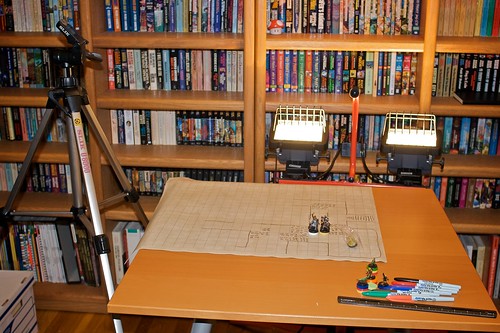
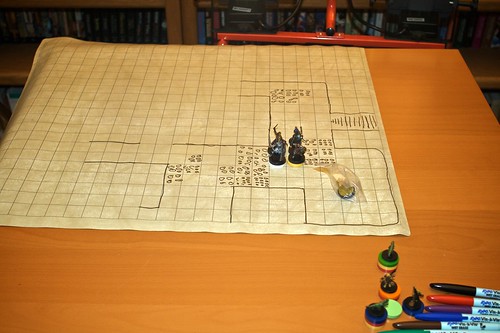
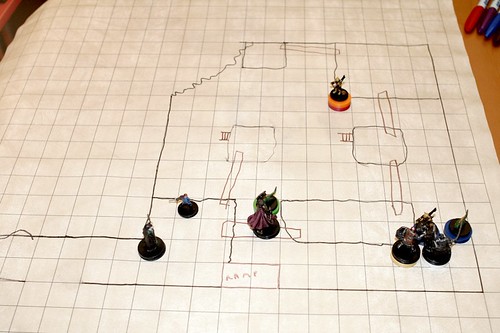
I left last week's D&D session set up on the table until I got a chance to take some photographs. I'm amused to talk about the process I use to play online and there are a couple of photo enthusiasts who read the blog who might well comment on improving the setup. First off, what the what? There's a long story behind this but the key bit is that I'm running a Dungeons & Dragons campaign online. We use Skype for voice chat, and I have this moderately janky Ruby on Rails application I threw together to display pictures to the players. I pop my camera up on a tripod and point it at miniatures and upload the pictures, thus giving us an online approximation of gathering around the table and playing. OK. So given that as background I was surprised at the amount of inconsistency I was getting from the pictures. On different nights the camera would focus on weird areas of the map, as I tried different camera angles I'd get different results, it's been a difficult process. I finally got a process I'm pretty happy with but I'm happy to hear suggestions for improvement. A lot of it is pretty ghetto. You can see my cheap-ass tripod that is supposed to be for Karin to have at school but I sort of stole. (Not to say it's school property's - it's Karin's but it lives in my office most of the time now.) I don't have a separate off-camera flash, or a stand and a nice diffusion umbrella and all - I have a halogen work light with two independent bulbs. The camera is my Canon Rebel XTi and I use a 28mm prime lens (which given the Canon crop factor works out to the effective crop of a 45mm lens). I've screwed with the lighting a lot and the thing that seems to work best is to point both halogen lights straight up and bounce them off the ceiling. I had been pointing one sideways as a fill light but that makes some really odd shadows on the miniatures. I let the camera use its flash for some fill. Normally I shoot in RAW mode, but for these shots I need a JPG and processing time is a concern so I just shoot JPG (the large and "unsmoothed" images since I can process them later and use better sharpening filters and the like). I usually put the camera in the A-DEP mode which tells the camera to maximize depth of field. I've left everything else on the "do what you think is best" sort of switches - so auto white balance and the like. ISO is set at 800. OK, enough babble. Here's the basic setup: My D&D Camera Setup In this shot the only lighting is the halogens you see and the flash of the camera itself. Oh, and there's a polarizing filter on the lens. Of course, normally the camera is on the tripod, but you get the idea. This was the real actual geometry I used in the last session, I just popped the camera off the tripod to shoot this. Here's a closer shot of the mat. The mat is "wet erase" which means I can draw on it with "Vis a Vis" markers - you can see those at the edge of the shot: Miniatures Playmat Closeup So what does this ultimately yield? Well I have an Automator action that tells the camera software to take a picture. Then it asks me to find the picture on the hard drive, passes it off to Pixelmator which does an "Auto Enhance" which adjusts the levels. Pixelmator also resizes to a 1023 pixel wide image (not sure how I picked that size, but it's what I use). Then it uploads the file to a public folder on the net and asks me for a description of the image. Finally it sends a special URL to the Rails application causing an update with the new picture and description and javascript on all the player's browsers fetches the new data automatically. Here's an actual example from last week's session, plucked straight from the web application: IMG_0004 So, like I said it works pretty well. But if anybody has any suggestions I'd love to hear them. While I think having photographic lighting would be a big win so far I've been hard pressed to say what else I'd use it for. I don't do posed portraits so I'd be buying lighting equipment just for D&D, which seems ridiculous.
Read more